Python with Mahamudullah
What is Python?
Python is a high-level, easy-to-read programming language used for general-purpose tasks like web development, automation, data analysis, and machine learning.
Display with print() function.
Basic print()
#Basic print() Usage
print("Hello, World!")
print('Hello, World!')
print('Yes, "apple" is a fruit')
print("Yes, 'apple' is a fruit")

#Printing Multiple Items
print('Hello', "World", 123, 4.56)

print("Newline character:\nThis is a new line.\n")
print("Tab character:\tThis is a tab.\n")
print("Quotes: \"Double quotes\" and \'Single quotes\'\n")
print("Quotes: % sign printing ")
separator between items
#Sep parameter to change the separator between items.

print("Hello", "World", 123, 4.56,sep="-")
# Output: Hello-World

print("Hello", "World", 123, 4.56,sep=", ")
# Output: A, B, C
'end' parameter
"""
'end' parameter to change what is printed at the end of the print statement.
By default, print() ends with a newline (\n).
"""
print("Hello")
print("World!")

print("Hello", end=" ")
print("World!")

print("Hello", end="---")
print("World!")
Printing Variables
#Printing Variables
name = "Hamza"
age = 25
print("Name:", name, "Age:", age)
print("Name:", name,"\n", "Age:", age)
print("Name: %s, Age: %d" %(name, age))
Formatted Strings (f-strings)
#Formatted Strings (f-strings)
name = "Hamza"
age = 25
print(f"Name: {name}, Age: {age}")

# Using expressions inside f-strings
print(f"Next year, {name} will be {age + 1} years old.")
format() Method
#Using the format() Method
name = "Hamza"
age = 25
print("Name: {}, Age: {}".format(name, age))

# Using positional arguments
print("Name: {1}, Age: {0}".format(name, age))

# Using keyword arguments
print("Name: {name}, Age: {age}".format(name="Hamza", age=20+1))
All in 1
#All Print In 1 Place

name = "Hamza"
age = 30

# Basic print
print("Hello, World!")

# Printing multiple items
print("Name:", name, "Age:", age)

# Using sep and end
print("Python", "is", "fun", sep="-", end="!\n")

# Formatted strings (f-strings)
print(f"{name} is {age} years old.")

# Using format() method
print("Next year, {} will be {} years old.".format(name, age + 1))
Variables & data types
Assigning Values to Variables
x = 5         # Integer
y = 3.14      # Float
name = "hamza"  # String
is_student = True  # Boolean

print(x, y, name, is_student)
print(x,"\n",y,"\n",name,"\n",is_student)
print(x, "\n", y, "\n", name, "\n", is_student, sep="")

# Assigning the multiple variables
a, b, c = 1, 2, 3
print(a, b, c)
# Assigning the same value to multiple variables
x = y = z = 10
print(x, y, z)
Changing Variable Types
x = 5         # x is an integer
x = "Hello"   # Now x is a string
print(x)
Type Conversion
# Converting between types
x = 5
y = 3.14
z = "123"

# Convert integer to float
x_float = float(x)
print(x_float)

# Convert float to integer
y_int = int(y)
print(y_int)

# Convert string to integer
z_int = int(z)
print(z_int)

# Convert integer to string
x_str = str(x)
print(x_str)
Global & Local variable
x = "global" # Global variable

def my_function():
    # Local variable
    y = "local"
    print(x)
    print(y)


my_function()
print(x)
#print(y)
Modify Global variable
x = "global Variable"

def my_function():
    global x
    x = "modified"
    print(x)

my_function()
print(x)
Constant
PI = 3.14159
GRAVITY = 9.8

#PI = 3

print(PI, GRAVITY)
Operators
Arithmetic Operators
x = 10
y = 3

print("Addition:",x + y)  # Addition
print("Subtraction:",x - y)  # Subtraction
print("Multiplication:",x * y)  # Multiplication
print("Division:",x / y)  # Division
print("Modulus:",x % y)  # Modulus
print("Exponentiation:",x ** y)  # Exponentiation
print("Floor division:",x // y)  # Floor division
Assignment Operators
x = 5 # x=5
x += 3  #(equivalent to x = x + 3)
print(x)  # Output: 8

x -= 2  #(equivalent to x = x - 2)
print(x)  # Output: 6

x *= 2  #(equivalent to x = x * 2)
print(x)  # Output: 12

x /= 3  # (equivalent to x = x / 3)
print(x)  # Output: 4.0

x %= 3  #(equivalent to x = x % 3)
print(x)  # Output: 1.0

x **= 2  # Raise x to the power of 2 (equivalent to x = x ** 2)
print(x)  # Output: 1.0

x //= 2  # Floor divide x by 2 (equivalent to x = x // 2)
print(x)  # Output: 0.0
Comparison Operators
x = 5
y = 3

print(x == y)  # Equal to: False
print(x != y)  # Not equal to: True
print(x > y)  # Greater than: True
print(x < y)  # Less than: False
print(x >= y)  # Greater than or equal to: True
print(x <= y)  # Less than or equal to: False
Logical Operators
x = True
y = False

print(x and y)  # Logical AND: False
print(x or y)  # Logical OR: True
print(not x)  # Logical NOT: False
Some Operators that need also
x = 10  # In binary: 1010
y = 4   # In binary: 0100
print(x is y)
print(x & y)  # Bitwise AND: 0 (0000)
print(x | y)  # Bitwise OR: 14 (1110)
print(x ^ y)  # Bitwise XOR: 14 (1110)
print(~x)  # Bitwise NOT: -11 (inverts all bits 1111 0101)
print(x << 2)  # Bitwise left shift: 40 (101000)
print(x >> 2)  # Bitwise right shift: 2 (0010)
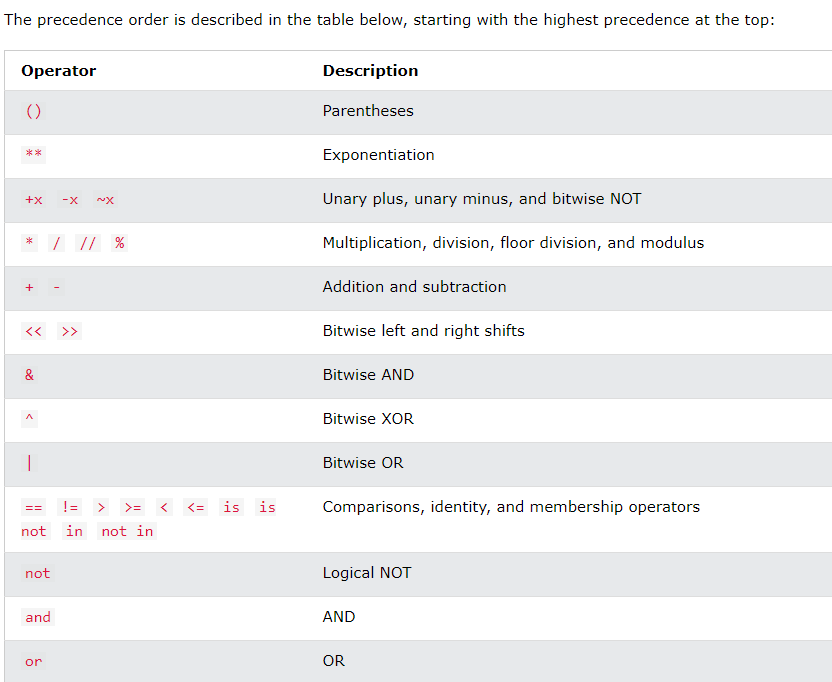
precedence order
Conditions
Basic syntax of if…else
- Equals: a == b
- Not Equals: a != b
- Less than: a < b
- Less than or equal to: a <= b
- Greater than: a > b
- Greater than or equal to: a >= b
x = 5
if x > 5:
    print("x is greater than 5")
elif x == 5:
    print("x is equal to 5")
else:
    print("x is less than 5")
Nested condition
x = 7
if x > 5:
    print("x is greater than 5")
    if x > 8:
        print("x is also greater than 8")
    else:
        print("x is less than or equal to 8")
Multiple Conditions
x = 7

if x > 5 and x < 10:
    print("x is between 5 and 10")
elif x < 5 or x > 10:
    print("x is either less than 5 or greater than 10")
Checking membership using “in”
fruits = ['apple', 'banana', 'cherry']
test='apple'
if test in fruits:
    print("Apple is in the list")
elif test not in fruits:
    print("Orange is not in the list")
Chained Conditions
a, b, c = 1, 2, 3
if a < b < c:
    print("a is less than b and b is less than c")
Short Hand
score = int(input("Enter the score: "))

# Use ternary operator to assign grades
grade = ("A+" if score >= 90 else "A" if score >= 80 else
         "A-" if score >= 70 else "B" if score >= 60 else "C")

print(f"Score: {score}, Grade: {grade}")

a = 5
b = None
result = b if b is not None else a
print(result)  # Output: 5
Loops
for loops
Basic for loops
numbers = [1, 2, 3, 4, 5]
for num in numbers:
    print(num)
Iterating over a Range
for i in range(5):
    print(i)
Iteration over strings
word = "Python"
for letter in word:
    print(letter)
Iterating over a Dictionary
student_grades = {"Alice": "A", "Bob": "B", "Charlie": "C"}
for name, grade in student_grades.items():
    print(f"{name}: {grade}")
While loops
Basic While loops
x = 0
while x < 5:
    print(x)
    x += 1
Infinite while loops
while True:
    print("This will print once")
    break
Using a Condition
n = 10
while n > 0:
    print(n)
    n -= 1
Loop Control Statements
break
for i in range(10):
    if i == 5:
        break
    print(i)
continue
for i in range(10):
    if i % 2 == 0:
        continue
    print(i)
pass
for i in range(5):
    if i == 3:
        pass
    print(i)
else with loops
for i in range(5):
    print(i)
else:
    print("Loop finished")
Nested Loops
for i in range(3):
    for j in range(2):
        print(f"i: {i}, j: {j}")
Common Use Cases for Loops
Looping through a List
my_list = [10, 20, 30, 40]
for item in my_list:
    print(item)
Looping through a Range
for i in range(0, 10, 2):  # start, stop, step
    print(i)
Looping over an Index and Value
colors = ['red', 'green', 'blue']
for index, color in enumerate(colors):
    print(index, color)
Looping over Multiple Lists
names = ["Alice", "Bob", "Charlie"]
scores = [85, 90, 95]
for name, score in zip(names, scores):
    print(f"{name} scored {score}")
Looping with List Comprehensions
Basic List Comprehension
squares = [x**2 for x in range(5)] print(squares)Explanation: This creates a list of squares for numbers from
0to4.
List Comprehension with if
evens = [x for x in range(10) if x % 2 == 0]
print(evens)
list
Creating a List
You can create a list by placing items inside square brackets
[], separated by commas.# List of integers numbers = [1, 2, 3, 4, 5] # List of strings fruits = ["apple", "banana", "cherry"] # List with mixed data types mixed_list = [1, "apple", 3.14, True] # Empty list empty_list = []
Accessing Elements in a List
# Access list Items

fruits = ["apple", "banana", "cherry", "orange", "kiwi", "melon", "mango"]

# Accessing items by index
print(fruits[0])
print(fruits[1])

# Negative indexing (access from the end)
print(fruits[-1])
print(fruits[-2])

# Range of Indexes
print(fruits[2:5]) # 2 - before 5
print(fruits[:4])  # 0 - before 4
print(fruits[2:])  # 2 - last

#Range of Negative Indexes
print(fruits[-4:-1]) # -4 to before -1
print(fruits[:-1])   # first to before -1
print(fruits[-4:])   # -4 to last

#Check if Item Exists
if "apple" in fruits:
  print('Yes, "apple" is in the fruits list')
Modifying Elements in a List
You can change the value of a list element by assigning a new value to the specific index.
fruitsList = ["apple", "banana", "cherry", "kiwi", "mango"]
fruitsList[1] = "blackcurrant"
print(fruitsList)
fruitsList[1:3] = ["watermelon", "blackcurrant"]
print(fruitsList)
fruitsList[1] = ["blackcurrant", "watermelon"]
print(fruitsList)
fruitsList[1:2] = ["blackcurrant", "watermelon"]
print(fruitsList)
Adding Elements to a List
There are several ways to add elements to a list:
append(): Adds an element to the end of the list.
insert(): Inserts an element at a specific position.
extend(): Adds all elements from another list to the end.
fruitsList1 = ["apple", "banana", "cherry"]

#Append item in list
fruitsList1.append("orange")
print(fruitsList1)

#Insert item in list
fruitsList1.insert(3, "naspoti")
print(fruitsList1)

#Extend List
tropical = ["mango", "pineapple", "papaya"]
fruitsList1.extend(tropical)
print(fruitsList1)

#Add Any Iterable (tuples, sets, dictionaries etc.).
fruitstuple = ("kiwi", "orange")
fruitsList1.extend(fruitstuple)
print(fruitsList1)
Removing Elements from a List
You can remove elements from a list in different ways:
remove(): Removes the first occurrence of a specified value.
pop(): Removes and returns the element at a specified index (default is the last element).
del: Deletes an element or slice by index.
clear(): Removes all elements from the list.
#using remove method
fruitsList2 = ['apple', 'banana', 'cherry', 'naspoti', 'orange']
fruitsList2.remove("banana")
print(fruitsList2)

# pop() method removes the specified index.
fruitsList2.pop(1)
print(fruitsList2)

# with out index pop() method removes the last item.
fruitsList2.pop()
print(fruitsList2)

# using del keyword
del fruitsList2[0]
print(fruitsList2)

#delet full list
#del fruitsList2
fruitsList2 = ['apple', 'banana', 'cherry', 'naspoti', 'orange']
print(fruitsList2)

#The clear() method empties the list.
fruitsList2.clear()
print(fruitsList2)
Slicing Lists
You can access a range of elements by using slicing. The syntax for slicing is
[start:stop:step]where:start: The index to start from (inclusive).
stop: The index to stop at (exclusive).
step: The step size (optional).
numbers = [1, 2, 3, 4, 5, 6, 7, 8, 9, 10]

# Get elements from index 2 to 5 (exclusive)
print(numbers[2:6])  # Output: [3, 4, 5, 6]

# Get every second element
print(numbers[::2])  # Output: [1, 3, 5, 7, 9]

# Reverse the list
print(numbers[::-1])  # Output: [10, 9, 8, 7, 6, 5, 4, 3, 2, 1]
Looping Through a List
You can loop through a list to access each element individually.
fruits = ["apple", "banana", "cherry"]

# Using a for loop
for fruit in fruits:
    print(fruit)

# Using a for loop with index
for i in range(len(fruits)):
    print(fruits[i])
List Comprehension
List comprehension provides a concise way to create lists based on existing lists. It's a shorthand for loops that can also include conditions.
# Create a list of squares of numbers from 1 to 5
squares = [x**2 for x in range(1, 6)]
print(squares)  # Output: [1, 4, 9, 16, 25]

# Create a list of even numbers from another list
numbers = [1, 2, 3, 4, 5, 6]
evens = [x for x in numbers if x % 2 == 0]
print(evens)  # Output: [2, 4, 6]
Common List Methods
Here are some commonly used list methods:
Method Description append(x)Adds an item xto the end of the listinsert(i, x)Inserts item xat positioniremove(x)Removes the first occurrence of xin the listpop(i)Removes and returns the item at position iclear()Removes all items from the list index(x)Returns the index of the first occurrence of xcount(x)Returns the number of occurrences of xin the listsort()Sorts the list in ascending order reverse()Reverses the list copy()Returns a shallow copy of the list Example of Common Methods:
fruits = ["apple", "banana", "cherry", "apple"]

# Find the index of the first occurrence of 'apple'
print(fruits.index("apple"))  # Output: 0

# Count how many times 'apple' appears in the list
print(fruits.count("apple"))  # Output: 2

# Sort the list
fruits.sort()
print(fruits)  # Output: ['apple', 'apple', 'banana', 'cherry']

# Reverse the list
fruits.reverse()
print(fruits)  # Output: ['cherry', 'banana', 'apple', 'apple']
Copying a List
When copying a list, it’s important to differentiate between shallow copies and deep copies.
- Shallow Copy: The copied list is a new list, but the elements are references to the same objects.
- Deep Copy: The copied list and all of its elements are new, independent objects.
import copy

# Shallow copy
list1 = [1, 2, 3]
list2 = list1.copy()
list2.append(4)
print(list1)  # Output: [1, 2, 3]
print(list2)  # Output: [1, 2, 3, 4]

# Deep copy (useful for lists of lists)
nested_list1 = [[1, 2], [3, 4]]
nested_list2 = copy.deepcopy(nested_list1)
nested_list2[0].append(5)
print(nested_list1)  # Output: [[1, 2], [3, 4]]
print(nested_list2)  # Output: [[1, 2, 5], [3, 4]]
Tuples
Creating Tuples
Tuples are created by placing elements inside parentheses
()separated by commas. A tuple can hold elements of different types (integers, strings, other tuples, etc.).# Tuple of integers numbers = (1, 2, 3, 4, 5) # Tuple of strings fruits = ("apple", "banana", "cherry") # Mixed tuple (different types) mixed_tuple = (1, "apple", 3.14, True) # Empty tuple empty_tuple = () # Single element tuple (you need a trailing comma) single_element_tuple = (1,) # Notice the comma
Accessing Tuple Items
You can access tuple elements by their index, just like lists. The first element has an index of 0.
fruits = ("apple", "banana", "cherry", "orange")

# Accessing items by index
print(fruits[0])  # Output: apple
print(fruits[1])  # Output: banana

# Negative indexing (access from the end)
print(fruits[-1])  # Output: orange
print(fruits[-2])  # Output: cherry
Slicing Tuples
You can slice a tuple to access a range of elements using the
start:stopindex. Thestartis inclusive, and thestopis exclusive.fruits = ("apple", "banana", "cherry", "orange", "kiwi", "melon", "mango") # Range of indexes print(fruits[2:5]) # Output: ('cherry', 'orange', 'kiwi') # From the start to a specific index print(fruits[:4]) # Output: ('apple', 'banana', 'cherry', 'orange') # From a specific index to the end print(fruits[2:]) # Output: ('cherry', 'orange', 'kiwi', 'melon', 'mango') # Range of negative indexes print(fruits[-4:-1]) # Output: ('orange', 'kiwi', 'melon')
Immutable Nature of Tuples
Unlike lists, you cannot modify (add, remove, or change) elements in a tuple after it has been created.
fruits = ("apple", "banana", "cherry")

# This will raise an error as tuples are immutable
# fruits[0] = "orange"  # Uncommenting this will raise a TypeError

# You also can't append items to a tuple
# fruits.append("orange")  # Uncommenting this will raise an AttributeError
Checking if an Item Exists in a Tuple
You can check whether an item exists in a tuple using the
inkeyword.fruits = ("apple", "banana", "cherry") # Check if "apple" is in the tuple if "apple" in fruits: print("Yes, 'apple' is in the fruits tuple")
Tuple Methods
Tuples have only two built-in methods:
count()andindex().fruits = ("apple", "banana", "cherry", "banana") # count(): Returns the number of times a value appears in the tuple print(fruits.count("banana")) # Output: 2 # index(): Returns the index of the first occurrence of the specified value print(fruits.index("cherry")) # Output: 2
Tuple Unpacking
You can unpack the values from a tuple into separate variables. The number of variables must match the number of values in the tuple.
fruits = ("apple", "banana", "cherry")

# Unpacking
(fruit1, fruit2, fruit3) = fruits

print(fruit1)  # Output: apple
print(fruit2)  # Output: banana
print(fruit3)  # Output: cherry
Looping Through a Tuple
You can use a
forloop to iterate through the elements of a tuple.fruits = ("apple", "banana", "cherry") # Loop through the tuple for fruit in fruits: print(fruit)
Nested Tuples
Tuples can contain other tuples, allowing you to create nested structures.
nested_tuple = ((1, 2), (3, 4), (5, 6))

# Access nested elements
print(nested_tuple[0])      # Output: (1, 2)
print(nested_tuple[0][1])   # Output: 2
Concatenating and Repeating Tuples
You can concatenate tuples using the
+operator and repeat a tuple using the*operator.fruits = ("apple", "banana") more_fruits = ("cherry", "orange") # Concatenation combined = fruits + more_fruits print(combined) # Output: ('apple', 'banana', 'cherry', 'orange') # Repetition repeated = fruits * 2 print(repeated) # Output: ('apple', 'banana', 'apple', 'banana')
Converting Between Lists and Tuples
You can convert a list to a tuple and vice versa.
# Convert a list to a tuple
fruits_list = ["apple", "banana", "cherry"]
fruits_tuple = tuple(fruits_list)
print(fruits_tuple)  # Output: ('apple', 'banana', 'cherry')

# Convert a tuple to a list
fruits_tuple = ("apple", "banana", "cherry")
fruits_list = list(fruits_tuple)
print(fruits_list)  # Output: ['apple', 'banana', 'cherry']
Immutability Workaround
Although you can't modify a tuple directly, you can convert it to a list, modify the list, and convert it back to a tuple.
fruits_tuple = ("apple", "banana", "cherry")

# Convert tuple to list, modify the list, and convert it back to tuple
fruits_list = list(fruits_tuple)
fruits_list[1] = "blueberry"
fruits_tuple = tuple(fruits_list)

print(fruits_tuple)  # Output: ('apple', 'blueberry', 'cherry')
Tuple with Different Data Types
Tuples can contain elements of different data types.
mixed_tuple = ("apple", 42, 3.14, True)
print(mixed_tuple)  # Output: ('apple', 42, 3.14, True)
Comparing Tuples
You can compare tuples lexicographically (element by element).
tuple1 = (1, 2, 3)
tuple2 = (1, 2, 4)

# Comparison
print(tuple1 < tuple2)  # Output: True (because 3 < 4)
Length of a Tuple
You can get the number of elements in a tuple using
len().fruits = ("apple", "banana", "cherry") print(len(fruits)) # Output: 3
Sets
Creating Sets
Sets are created using curly braces
{}or theset()function. A set can contain different data types, but all items must be hashable (immutable types like numbers, strings, and tuples).# Set of integers numbers = {1, 2, 3, 4, 5} # Set of strings fruits = {"apple", "banana", "cherry"} # Mixed data types mixed_set = {1, "apple", 3.14} # Empty set (Note: using {} creates an empty dictionary, not a set) empty_set = set()
Accessing Set Items
You cannot access set items by index, because sets are unordered. However, you can loop through the set to access its elements.
fruits = {"apple", "banana", "cherry"}

# Loop through the set
for fruit in fruits:
    print(fruit)
Adding Elements to a Set
add(): Adds a single element to the set.
update(): Adds multiple elements (can be another set, list, or any iterable).
fruits = {"apple", "banana"}

# Add a single element
fruits.add("cherry")
print(fruits)  # Output: {'apple', 'banana', 'cherry'}

# Add multiple elements using update()
fruits.update(["orange", "mango"])
print(fruits)  # Output: {'apple', 'banana', 'cherry', 'orange', 'mango'}
Removing Elements from a Set
There are several ways to remove elements from a set:
remove(): Removes a specified element, raises an error if the element is not found.
discard(): Removes a specified element, does not raise an error if the element is not found.
pop(): Removes and returns a random element (sets are unordered, so it removes an arbitrary item).
clear(): Removes all elements from the set.
fruits = {"apple", "banana", "cherry"}

# Remove an element
fruits.remove("banana")
print(fruits)  # Output: {'apple', 'cherry'}

# Discard an element (no error if element is not found)
fruits.discard("banana")  # No error, does nothing

# Remove a random element using pop()
removed_item = fruits.pop()
print(removed_item)  # Output: random element like 'apple'

# Clear the set
fruits.clear()
print(fruits)  # Output: set()
Set Operations
Sets support various mathematical operations like union, intersection, difference, and symmetric difference.
a. Union: Combines all unique elements from both sets.
set1 = {1, 2, 3}
set2 = {3, 4, 5}

union_set = set1.union(set2)
print(union_set)  # Output: {1, 2, 3, 4, 5}
b. Intersection: Returns the common elements between sets.
set1 = {1, 2, 3}
set2 = {3, 4, 5}

intersection_set = set1.intersection(set2)
print(intersection_set)  # Output: {3}
c. Difference: Returns elements that are only in the first set.
set1 = {1, 2, 3}
set2 = {3, 4, 5}

difference_set = set1.difference(set2)
print(difference_set)  # Output: {1, 2}
d. Symmetric Difference: Returns elements that are in either set, but not in both.
set1 = {1, 2, 3}
set2 = {3, 4, 5}

symmetric_difference_set = set1.symmetric_difference(set2)
print(symmetric_difference_set)  # Output: {1, 2, 4, 5}
Checking for Element in a Set
You can check if an element is in a set using the
inkeyword.fruits = {"apple", "banana", "cherry"} # Check if "apple" is in the set if "apple" in fruits: print("Yes, 'apple' is in the fruits set")
Set Methods
Here’s a list of common set methods:
Method Description add(x)Adds element xto the set.update(iterable)Adds multiple elements from an iterable (like list/set). remove(x)Removes xfrom the set. Raises KeyError if not found.discard(x)Removes xfrom the set. Does nothing if not found.pop()Removes and returns an arbitrary element from the set. clear()Removes all elements from the set. union(set2)Returns a new set with all unique elements of both sets. intersection(set2)Returns a new set with common elements between sets. difference(set2)Returns a new set with elements only in the first set. symmetric_difference(set2)Returns a set with elements in either but not both.
Looping Through a Set
You can loop through the elements of a set using a
forloop.fruits = {"apple", "banana", "cherry"} # Loop through the set for fruit in fruits: print(fruit)
Frozen Sets
A frozenset is an immutable version of a set. Once created, you cannot modify it (no adding or removing elements). Frozensets are useful when you need to ensure that a set cannot be changed.
# Creating a frozenset
frozen_fruits = frozenset(["apple", "banana", "cherry"])

# Attempting to modify a frozenset will raise an error
# frozen_fruits.add("orange")  # Raises AttributeError
Set with Mixed Data Types
You can have sets with different data types, but only immutable data types can be stored in a set (e.g., you can't store a list in a set, but you can store a tuple).
mixed_set = {1, "apple", 3.14, (2, 3)}

# Attempting to add a mutable type like a list will raise an error
# mixed_set.add([1, 2])  # Raises TypeError
Converting Between Lists, Tuples, and Sets
You can convert lists and tuples to sets and vice versa. This is useful when you want to remove duplicates from a list or tuple.
# Convert list to set (removes duplicates)
fruits_list = ["apple", "banana", "cherry", "apple"]
fruits_set = set(fruits_list)
print(fruits_set)  # Output: {'apple', 'banana', 'cherry'}

# Convert set back to list
fruits_list = list(fruits_set)
print(fruits_list)  # Output: ['apple', 'banana', 'cherry']
Set Comprehension
Just like list comprehensions, you can create sets using set comprehension.
# Create a set of squares
squares = {x**2 for x in range(6)}
print(squares)  # Output: {0, 1, 4, 9, 16, 25}
Finding the Length of a Set
You can find the number of elements in a set using
len().fruits = {"apple", "banana", "cherry"} print(len(fruits)) # Output: 3
Copying a Set
You can copy a set using the
copy()method.fruits = {"apple", "banana", "cherry"} fruits_copy = fruits.copy() print(fruits_copy) # Output: {'apple', 'banana', 'cherry'}
Dictionary
Creating a Dictionary
Dictionaries are created by placing items inside curly braces
{}in key-value pairs, where each key is followed by a colon (:) and then the value.# Creating a dictionary person = { "name": "Alice", "age": 25, "city": "New York" } # Empty dictionary empty_dict = {} # Using the dict() function person2 = dict(name="Bob", age=30, city="Los Angeles")
Accessing Dictionary Items
You can access the values in a dictionary by using the keys inside square brackets
[]or by using theget()method.person = {"name": "Alice", "age": 25, "city": "New York"} # Accessing items by key print(person["name"]) # Output: Alice print(person["age"]) # Output: 25 # Using the get() method print(person.get("city")) # Output: New York # If a key does not exist, get() returns None (or a default value) print(person.get("country", "Unknown")) # Output: Unknown
Adding and Modifying Items in a Dictionary
You can add new key-value pairs to a dictionary or modify existing ones by assigning values to the keys.
person = {"name": "Alice", "age": 25}

# Add a new key-value pair
person["city"] = "New York"
print(person)  # Output: {'name': 'Alice', 'age': 25, 'city': 'New York'}

# Modify an existing key-value pair
person["age"] = 26
print(person)  # Output: {'name': 'Alice', 'age': 26, 'city': 'New York'}
Removing Items from a Dictionary
There are multiple ways to remove items from a dictionary:
pop(): Removes an item by key and returns its value.
del: Deletes an item or the entire dictionary.
popitem(): Removes and returns the last inserted key-value pair (in versions after Python 3.7).
clear(): Removes all items from the dictionary.
person = {"name": "Alice", "age": 25, "city": "New York"}

# Remove a key-value pair and return its value
age = person.pop("age")
print(age)       # Output: 25
print(person)    # Output: {'name': 'Alice', 'city': 'New York'}

# Remove a key-value pair using del
del person["city"]
print(person)  # Output: {'name': 'Alice'}

# Remove the last inserted item (Python 3.7+)
last_item = person.popitem()
print(last_item)  # Output: ('name', 'Alice')

# Clear the dictionary
person.clear()
print(person)  # Output: {}
Looping Through a Dictionary
You can loop through a dictionary in three main ways: by keys, values, or key-value pairs.
person = {"name": "Alice", "age": 25, "city": "New York"}

# Loop through keys
for key in person:
    print(key)

# Loop through values
for value in person.values():
    print(value)

# Loop through key-value pairs
for key, value in person.items():
    print(f"{key}: {value}")
Checking if a Key Exists in a Dictionary
You can use the
inkeyword to check if a key exists in the dictionary.person = {"name": "Alice", "age": 25} # Check if a key exists if "name" in person: print("Name is present") # Output: Name is present # Check if a key does not exist if "salary" not in person: print("Salary is not present") # Output: Salary is not present
Dictionary Methods
Here’s a list of common dictionary methods:
Method Description get(key, default)Returns the value of the specified key, or a default value. keys()Returns a view object of all keys. values()Returns a view object of all values. items()Returns a view object of all key-value pairs. pop(key)Removes the item with the specified key and returns its value. popitem()Removes the last inserted key-value pair. clear()Removes all items from the dictionary. update(other_dict)Updates the dictionary with the key-value pairs from another dictionary. copy()Returns a shallow copy of the dictionary.
Copying a Dictionary
You can create a copy of a dictionary using the
copy()method or thedict()function. This creates a shallow copy (i.e., only the dictionary itself is copied, not the nested structures).person = {"name": "Alice", "age": 25} # Copy using copy() method person_copy = person.copy() print(person_copy) # Output: {'name': 'Alice', 'age': 25} # Copy using dict() function person_copy2 = dict(person) print(person_copy2) # Output: {'name': 'Alice', 'age': 25}
Merging Dictionaries
You can merge two dictionaries using the
update()method, which adds key-value pairs from one dictionary to another. If a key already exists, its value is updated.person = {"name": "Alice", "age": 25} address = {"city": "New York", "country": "USA"} # Merge dictionaries using update() person.update(address) print(person) # Output: {'name': 'Alice', 'age': 25, 'city': 'New York', 'country': 'USA'}
Dictionary Comprehension
Dictionary comprehension is a concise way to create dictionaries from iterable data structures.
# Create a dictionary of squares
squares = {x: x**2 for x in range(5)}
print(squares)  # Output: {0: 0, 1: 1, 2: 4, 3: 9, 4: 16}

# Create a dictionary from a list of tuples
fruits = [("apple", 3), ("banana", 2), ("cherry", 5)]
fruit_dict = {fruit: quantity for fruit, quantity in fruits}
print(fruit_dict)  # Output: {'apple': 3, 'banana': 2, 'cherry': 5}
Nested Dictionaries
You can create dictionaries that contain other dictionaries, allowing you to store structured data.
students = {
    "Alice": {"age": 25, "grade": "A"},
    "Bob": {"age": 22, "grade": "B"}
}

# Accessing nested values
print(students["Alice"]["grade"])  # Output: A

# Modifying nested values
students["Bob"]["age"] = 23
print(students["Bob"]["age"])  # Output: 23
Converting Between Lists and Dictionaries
You can convert lists of tuples or lists of lists into dictionaries using the
dict()function. This is useful when you have paired data.# List of tuples to dictionary fruits = [("apple", 3), ("banana", 2), ("cherry", 5)] fruit_dict = dict(fruits) print(fruit_dict) # Output: {'apple': 3, 'banana': 2, 'cherry': 5} # Dictionary to list of tuples fruit_items = list(fruit_dict.items()) print(fruit_items) # Output: [('apple', 3), ('banana', 2), ('cherry', 5)]
Finding the Length of a Dictionary
You can use the
len()function to find the number of key-value pairs in a dictionary.person = {"name": "Alice", "age": 25, "city": "New York"} print(len(person)) # Output: 3
Using
delto Delete a DictionaryYou can delete an entire dictionary using the
delkeyword.person = {"name": "Alice", "age": 25} del person # Now, person no longer exists and will raise an error if accessed
Functions
A function in Python is a block of code that only runs when it is called. Functions are used to organize code, perform specific tasks, and promote reusability.
Defining a Function
You define a function using the
defkeyword, followed by the function name, parentheses(), and a colon:. Inside the function, the code block is indented.# Basic function definition def greet(): print("Hello, world!") # Calling the function greet() # Output: Hello, world!
Function with Parameters
You can pass data (parameters) into a function to make it more flexible. Parameters are specified inside the parentheses.
def greet_person(name):
    print(f"Hello, {name}!")

# Calling the function with an argument
greet_person("Alice")  # Output: Hello, Alice!
Function with Return Value
A function can return a result using the
returnstatement. This allows the function to produce a value that can be used elsewhere in the program.def add_numbers(a, b): return a + b # Store the result of the function call in a variable result = add_numbers(5, 3) print(result) # Output: 8
Default Parameter Values
You can provide default values for parameters, so that if no argument is passed during the function call, the default value is used.
def greet_person(name="Guest"):
    print(f"Hello, {name}!")

# Calling the function with and without an argument
greet_person("Alice")  # Output: Hello, Alice!
greet_person()         # Output: Hello, Guest!
Keyword Arguments
You can pass arguments to a function by specifying the parameter names (keyword arguments). This allows you to pass arguments in any order.
def describe_person(name, age):
    print(f"{name} is {age} years old.")

# Using keyword arguments
describe_person(age=30, name="Bob")  # Output: Bob is 30 years old.
Arbitrary Arguments
If you don't know how many arguments will be passed to the function, you can use
*fnameto accept an arbitrary number of arguments. This collects the arguments into a tuple.def add_numbers(*args): total = sum(args) print(f"Total: {total}") # Calling the function with multiple arguments add_numbers(1, 2, 3, 4) # Output: Total: 10
Arbitrary Keyword Arguments (
**name)You can use
**nameto accept an arbitrary number of keyword arguments. This collects the arguments into a dictionary.def describe_person(**kwargs): for key, value in kwargs.items(): print(f"{key}: {value}") # Passing keyword arguments to the function describe_person(name="Alice", age=25, city="New York") # Output: # name: Alice # age: 25 # city: New York
Returning Multiple Values
A function can return multiple values, which are returned as a tuple.
def calculate(a, b):
    sum_value = a + b
    product = a * b
    return sum_value, product

# Receiving multiple return values
result_sum, result_product = calculate(3, 4)
print(result_sum)      # Output: 7
print(result_product)  # Output: 12
Anonymous Functions (
lambdaFunctions)A
lambdafunction is a small anonymous function that can have any number of arguments but only one expression. It’s commonly used for short operations.# Lambda function to add two numbers add = lambda a, b: a + b print(add(5, 3)) # Output: 8 # Lambda function with map() numbers = [1, 2, 3, 4] squared = list(map(lambda x: x**2, numbers)) print(squared) # Output: [1, 4, 9, 16]
Nested Functions
You can define a function inside another function, and the inner function can be called from within the outer function.
def outer_function(text):
    def inner_function():
        print(text)
    inner_function()

# Calling the outer function
outer_function("Hello from inner function!")  # Output: Hello from inner function!
Function Scope
Variables defined inside a function are in the local scope and can only be accessed within that function.
def my_function():
    x = 10  # Local variable
    print(x)

my_function()  # Output: 10
# print(x)  # This will raise an error since x is not accessible outside the function
Global Variables in Functions
You can use the
globalkeyword to modify a global variable inside a function.x = 10 # Global variable def modify_global(): global x x = 20 modify_global() print(x) # Output: 20
nonlocalKeywordThe
nonlocalkeyword allows you to modify a variable in the nearest enclosing scope (outside of the current function but not global).def outer(): x = 10 def inner(): nonlocal x x = 20 inner() print(x) outer() # Output: 20
Recursive Functions
A recursive function is a function that calls itself. Recursion is useful when a problem can be broken down into smaller, similar problems.
def factorial(n):
    if n == 1:
        return 1
    else:
        return n * factorial(n - 1)

# Calling the recursive function
result = factorial(5)
print(result)  # Output: 120
Function Arguments: Positional vs. Keyword
You can pass arguments by position or by keyword.
def greet(name, message):
    print(f"{message}, {name}!")

# Positional arguments
greet("Alice", "Hello")  # Output: Hello, Alice!

# Keyword arguments
greet(message="Hi", name="Bob")  # Output: Hi, Bob!
Combine Positional - Only and Keyword Only
- Keyword-Only Arguments
To specify that a function can have only keyword arguments, add
*,before the arguments:def my_function(*, x): print(x) my_function(x = 3)- Positional-Only Arguments
To specify that a function can have only positional arguments, add
, /after the arguments:def my_function(x, /): print(x) my_function(3)- Combine
To specify that a function can have only positional arguments, add
, /after the arguments:def my_function(a, b, /, *, c, d): print(a + b + c + d) my_function(5, 6, c = 7, d = 8)
Example student system without OOP
Problem: Simple Student Management System
You are tasked with building a Student Management System using Python. The system should allow users to:
- Add a student: A student will have a name, age, and a list of courses.
- Display all students: List all students along with their details (name, age, and courses).
- Search for a student: Search for a student by name and display their details if found.
- Remove a student: Remove a student by name.
- List unique courses: Display all unique courses taken by students (without duplicates).
- Exit: Exit the program.
The system should keep running until the user chooses to exit. You need to manage students' data efficiently using lists, dictionaries, and sets. The solution should handle multiple students and perform all operations based on user input.
Solution
Here’s how to implement the Student Management System:
- Store student data in a list, where each student is represented as a dictionary containing their name, age, and the courses they are enrolled in.
- Use functions to:
- Add a student.
- Display all students.
- Search for a student by name.
- Remove a student by name.
- List unique courses taken by students using a set.
- Provide a menu system using a
whileloop that keeps asking the user for their choice until they choose to exit.
- Use conditional statements to process the user's menu selection.
- Use loops to iterate over students and perform actions like displaying or searching.
Code Solution:
# List to store information about students
students = []

# Function to add a student
def add_student(name, age, courses):
    """Add a student with their name, age, and list of courses."""
    # Each student is represented as a dictionary
    student = {
        'name': name,
        'age': age,
        'courses': courses
    }
    students.append(student)  # Add the student to the list
    print(f"Student {name} has been added.")

# Function to display all students
def display_students():
    """Display the list of all students with their details."""
    if not students:
        print("No students found.")
        return
    for student in students:
        print(f"Name: {student['name']}, Age: {student['age']}, Courses: {', '.join(student['courses'])}")

# Function to search for a student by name
def search_student(name):
    """Search for a student by name and display their details."""
    for student in students:
        if student['name'].lower() == name.lower():
            print(f"Found student: Name: {student['name']}, Age: {student['age']}, Courses: {', '.join(student['courses'])}")
            return
    print(f"Student with the name '{name}' not found.")

# Function to remove a student by name
def remove_student(name):
    """Remove a student by name."""
    for student in students:
        if student['name'].lower() == name.lower():
            students.remove(student)
            print(f"Student {name} has been removed.")
            return
    print(f"Student with the name '{name}' not found.")

# Function to list all unique courses taken by students (using sets)
def list_unique_courses():
    """List all unique courses taken by students."""
    all_courses = set()  # Using a set to track unique courses
    for student in students:
        all_courses.update(student['courses'])  # Add courses to the set
    if not all_courses:
        print("No courses found.")
    else:
        print("Unique courses:", ", ".join(all_courses))

# Main program loop
def main():
    while True:
        print("\\nStudent Management System")
        print("1. Add Student")
        print("2. Display All Students")
        print("3. Search Student")
        print("4. Remove Student")
        print("5. List Unique Courses")
        print("6. Exit")
        choice = input("Choose an option (1-6): ")

        if choice == '1':
            # Adding a student
            name = input("Enter student name: ")
            age = input("Enter student age: ")
            courses = input("Enter courses (comma-separated): ").split(",")
            courses = [course.strip() for course in courses]  # Clean up spaces
            add_student(name, age, courses)

        elif choice == '2':
            # Display all students
            display_students()

        elif choice == '3':
            # Search for a student
            name = input("Enter the student's name to search: ")
            search_student(name)

        elif choice == '4':
            # Remove a student
            name = input("Enter the student's name to remove: ")
            remove_student(name)

        elif choice == '5':
            # List unique courses
            list_unique_courses()

        elif choice == '6':
            # Exit the program
            print("Exiting the system. Goodbye!")
            break

        else:
            print("Invalid option. Please choose between 1 and 6.")

# Call the main program loop
main()
Breakdown of the Solution:
- Global List (
students):- We store the list of students as dictionaries in the
studentslist, where each dictionary contains a student's name, age, and courses.
- We store the list of students as dictionaries in the
- Functions:
add_student(name, age, courses): Adds a student to the list by storing their details as a dictionary.
display_students(): Displays all students stored in the list.
search_student(name): Searches for a student by name (case-insensitive) and prints their details if found.
remove_student(name): Removes a student by name from the list.
list_unique_courses(): Uses a set to store and display unique courses taken by all students.
- Main Program Loop:
- The
while Trueloop keeps the program running, continuously displaying a menu and prompting the user for their choice.
- Based on the user’s input, appropriate functions are called to perform the desired action (add, display, search, remove, or list unique courses).
- The loop exits when the user selects the option to quit (
choice == '6').
- The
- Conditionals:
if-elif-elsestatements are used to handle different user selections from the menu.
- Data Structures:
- List (
students): Stores multiple student dictionaries.
- Dictionary: Represents each student's information (name, age, courses).
- Set: Used to store unique courses from all students, ensuring no duplicate courses are shown.
- List (
Sample Run:
Student Management System
1. Add Student
2. Display All Students
3. Search Student
4. Remove Student
5. List Unique Courses
6. Exit
Choose an option (1-6): 1
Enter student name: Alice
Enter student age: 20
Enter courses (comma-separated): Math, English, History
Student Alice has been added.

Student Management System
1. Add Student
2. Display All Students
3. Search Student
4. Remove Student
5. List Unique Courses
6. Exit
Choose an option (1-6): 2
Name: Alice, Age: 20, Courses: Math, English, History

Student Management System
1. Add Student
2. Display All Students
3. Search Student
4. Remove Student
5. List Unique Courses
6. Exit
Choose an option (1-6): 5
Unique courses: Math, English, History

Student Management System
1. Add Student
2. Display All Students
3. Search Student
4. Remove Student
5. List Unique Courses
6. Exit
Choose an option (1-6): 6
Exiting the system. Goodbye!
Key Concepts Covered:
- Variables: Used to store student data (name, age, courses).
- Functions: To organize and encapsulate logic (e.g., adding, searching, displaying, and removing students).
- Conditionals: To handle menu selections and perform appropriate actions.
- Loops:
forloops to iterate over the list of students, and awhileloop to keep the program running until the user exits.
- Lists and Dictionaries: Used to store and manage students’ information.
- Sets: Used to collect unique courses across students.
This solution effectively demonstrates core programming concepts in Python without using object-oriented principles.
Object-oriented programming (OOP)
classes: In Python, classes provide a means of bundling data and functionality together. Creating a new class creates a new type of object, allowing new instances of that type to be made. Objects are instances of a class, and they can have attributes (data) and methods (functions that belong to the object).
Defining a Class
A class is defined using the
classkeyword, followed by the class name .Example:
# Defining a class
class Person:
    pass  # The pass statement is used as a placeholder for an empty class
Creating an Object (Instance)
To create an object, or an instance of a class, you call the class name as if it were a function. The object can then have its own attributes and methods.
Example:
# Defining a class
class Person:
    def __init__(self, name, age):
        self.name = name  # Attribute
        self.age = age    # Attribute

# Creating an object (instance of the class)
person1 = Person("Alice", 30)

# Accessing object attributes
print(person1.name)  # Output: Alice
print(person1.age)   # Output: 30
Explanation:
__init__method: This is the class constructor, which is called when a new object is created. It initializes the object with the provided values.
self: Refers to the current instance of the class and is used to access variables that belong to the class.
Class Attributes and Methods
You can define attributes (data) and methods (functions) inside a class. Methods are functions that belong to an object and can operate on its data.
Example:
class Person:
    # Constructor
    def __init__(self, name, age):
        self.name = name
        self.age = age

    # Method to display the person's details
    def display_info(self):
        print(f"Name: {self.name}, Age: {self.age}")

# Creating an object and calling its method
person1 = Person("Bob", 25)
person1.display_info()  # Output: Name: Bob, Age: 25
Modifying Object Attributes
You can modify object attributes after the object has been created, either directly or by using methods.
Example:
class Person:
    def __init__(self, name, age):
        self.name = name
        self.age = age

    def update_age(self, new_age):
        self.age = new_age  # Method to update the age

# Create an object
person1 = Person("Alice", 30)

# Modifying an attribute directly
person1.age = 31
print(person1.age)  # Output: 31

# Modifying an attribute using a method
person1.update_age(32)
print(person1.age)  # Output: 32
Class vs. Instance Attributes
- Instance attributes are defined inside methods and belong to individual objects (each object has its own copy).
- Class attributes are shared by all objects of the class and are defined outside the methods.
Example:
class Person:
    species = "Homo sapiens"  # Class attribute (shared by all instances)

    def __init__(self, name, age):
        self.name = name       # Instance attribute
        self.age = age         # Instance attribute

# Create objects
person1 = Person("Alice", 30)
person2 = Person("Bob", 25)

# Accessing class and instance attributes
print(person1.species)  # Output: Homo sapiens (class attribute)
print(person2.species)  # Output: Homo sapiens (class attribute)
print(person1.name)     # Output: Alice (instance attribute)
Encapsulation
In Python, you can restrict access to certain attributes or methods by using underscores to indicate privacy levels.
- Public attributes/methods: No underscore (
self.name).
- Protected attributes/methods: Single underscore (
_self._name).
- Private attributes/methods: Double underscore (
self.__name).
Example:
class Person: def __init__(self, name, age): self.name = name # Public self._protected_attr = "Protected" # Protected self.__private_attr = "Private" # Private def get_private_attr(self): return self.__private_attr person1 = Person("Alice", 30) print(person1.name) # Output: Alice (public attribute) print(person1._protected_attr) # Output: Protected (protected attribute) print(person1.get_private_attr()) # Output: Private (accessing private attribute)- Public attributes/methods: No underscore (
Inheritance
Inheritance allows one class (child class) to inherit the attributes and methods of another class (parent class). This allows for code reusability.
Example:
# Parent class
class Animal:
    def __init__(self, name):
        self.name = name

    def speak(self):
        print(f"{self.name} makes a sound.")

# Child class (inherits from Animal)
class Dog(Animal):
    def speak(self):
        print(f"{self.name} barks.")

# Create objects of the parent and child classes
dog = Dog("Buddy")
dog.speak()  # Output: Buddy barks
Explanation:
- The
Dogclass inherits from theAnimalclass and overrides thespeakmethod.
- The
__str__and__repr__MethodsThe
__str__method is used to define a human-readable string representation of an object, while__repr__is used for the “official” string representation of the object (often used for debugging).Example:
class Person:
    def __init__(self, name, age):
        self.name = name
        self.age = age

    def __str__(self):
        return f"Person({self.name}, {self.age})"

# Create an object
person = Person("Alice", 30)
print(person)  # Output: Person(Alice, 30)
Polymorphism
Polymorphism is an important concept in object-oriented programming that refers to the ability to use a common interface for different data types. In simple terms, polymorphism allows different classes to define methods with the same name, but potentially different implementations, and Python will automatically call the correct method depending on the object type.
Types of Polymorphism in Python
- Method Overriding (Run-time Polymorphism)
- Method Overloading (Compile-time Polymorphism) – Not supported natively in Python
- Polymorphism with Functions and Objects
1. Method Overriding (Run-time Polymorphism)
In method overriding, the child class (subclass) can have its own implementation of a method that is already defined in its parent class (superclass). This allows different behaviors for the same method depending on the object that is calling the method.
Example:
class Animal:
    def sound(self):
        print("This animal makes a sound")

class Dog(Animal):
    def sound(self):
        print("The dog barks")

class Cat(Animal):
    def sound(self):
        print("The cat meows")

# Creating objects of different classes
animal = Animal()
dog = Dog()
cat = Cat()

# Calling the overridden method on each object
animal.sound()  # Output: This animal makes a sound
dog.sound()     # Output: The dog barks
cat.sound()     # Output: The cat meows
Explanation:
- The
sound()method is defined in the parent classAnimaland overridden in the child classesDogandCat.
- Depending on the object (whether it's an instance of
Animal,Dog, orCat), the appropriatesound()method is called, demonstrating runtime polymorphism.
2. Method Overloading (Not Supported Natively in Python)
Method overloading is a form of polymorphism where multiple methods share the same name but have different parameters (e.g., different numbers of parameters or types of parameters). However, Python does not support method overloading natively.
If you define multiple methods with the same name in a class, the latest one will overwrite the previous ones.
Example (not native):
class MathOperations:
    def add(self, a, b):
        return a + b

    def add(self, a, b, c):
        return a + b + c

math_op = MathOperations()
# The last defined method (add with 3 parameters) will be used.
# print(math_op.add(1, 2))  # This will raise an error because only the 3-parameter version exists.
print(math_op.add(1, 2, 3))  # Output: 6
To achieve a similar behavior, you can use default arguments or
*args.Example Using
args:class MathOperations: def add(self, *args): return sum(args) math_op = MathOperations() print(math_op.add(1, 2)) # Output: 3 print(math_op.add(1, 2, 3)) # Output: 63. Polymorphism with Functions and Objects
Polymorphism in Python works with functions and objects as well. You can use polymorphism with functions that can accept different objects and perform actions based on their class, even if they are of different types.
Example: Polymorphism with Function
class Dog:
    def sound(self):
        return "Bark"

class Cat:
    def sound(self):
        return "Meow"

def animal_sound(animal):
    print(animal.sound())

# Create instances of Dog and Cat
dog = Dog()
cat = Cat()

# Pass objects of different types to the same function
animal_sound(dog)  # Output: Bark
animal_sound(cat)  # Output: Meow
Explanation:
- The function
animal_sound()can accept objects of different types (bothDogandCat) and call theirsound()methods, demonstrating polymorphism.
Example library management with OOP
Problem: Simple Library Management System (OOP Version)
You are tasked with building a Library Management System using Object-Oriented Programming (OOP) in Python. The system should allow you to:
- Add a book: A book has a title, author, and availability status.
- Display all books: List all books in the library with their details.
- Borrow a book: Mark a book as borrowed if it is available.
- Return a book: Mark a borrowed book as available.
- Exit: Exit the program.
You will use classes and objects to implement this system. The system will keep running until the user chooses to exit.
Solution
Here’s how to implement the Library Management System using OOP:
- Create a Book class that represents a book in the library.
- Create a Library class that manages the collection of books and provides methods to add, display, borrow, and return books.
- Use methods inside these classes to handle actions related to the books.
- Implement encapsulation by using class attributes and methods.
- Use a main loop to interact with the user and perform library operations.
Code Solution:
# Define the Book class
class Book:
    def __init__(self, title, author):
        """Constructor to initialize the book's title, author, and availability."""
        self.title = title
        self.author = author
        self.available = True  # By default, the book is available

    def borrow(self):
        """Mark the book as borrowed."""
        if self.available:
            self.available = False
            print(f"You have borrowed '{self.title}'.")
        else:
            print(f"Sorry, '{self.title}' is currently unavailable.")

    def return_book(self):
        """Mark the book as available."""
        if not self.available:
            self.available = True
            print(f"'{self.title}' has been returned and is now available.")
        else:
            print(f"'{self.title}' is already available in the library.")

    def display(self):
        """Display the book's details, including its availability."""
        status = "Available" if self.available else "Borrowed"
        print(f"Title: {self.title}, Author: {self.author}, Status: {status}")

# Define the Library class
class Library:
    def __init__(self):
        """Constructor to initialize an empty list of books."""
        self.books = []

    def add_book(self, title, author):
        """Add a new book to the library."""
        new_book = Book(title, author)  # Create a new book object
        self.books.append(new_book)
        print(f"Book '{title}' by {author} added to the library.")

    def display_books(self):
        """Display all the books in the library."""
        if not self.books:
            print("No books available in the library.")
        else:
            print("\\nList of books in the library:")
            for book in self.books:
                book.display()  # Call the display method from the Book class

    def borrow_book(self, title):
        """Search for a book by title and mark it as borrowed if available."""
        for book in self.books:
            if book.title.lower() == title.lower():
                book.borrow()  # Call the borrow method from the Book class
                return
        print(f"Book '{title}' not found in the library.")

    def return_book(self, title):
        """Search for a book by title and mark it as available."""
        for book in self.books:
            if book.title.lower() == title.lower():
                book.return_book()  # Call the return_book method from the Book class
                return
        print(f"Book '{title}' not found in the library.")

# Main program loop
def main():
    library = Library()  # Create a Library object
    while True:
        print("\\nLibrary Management System")
        print("1. Add Book")
        print("2. Display All Books")
        print("3. Borrow Book")
        print("4. Return Book")
        print("5. Exit")
        choice = input("Choose an option (1-5): ")

        if choice == '1':
            # Add a book to the library
            title = input("Enter the book title: ")
            author = input("Enter the book author: ")
            library.add_book(title, author)

        elif choice == '2':
            # Display all books in the library
            library.display_books()

        elif choice == '3':
            # Borrow a book from the library
            title = input("Enter the title of the book to borrow: ")
            library.borrow_book(title)

        elif choice == '4':
            # Return a book to the library
            title = input("Enter the title of the book to return: ")
            library.return_book(title)

        elif choice == '5':
            # Exit the program
            print("Exiting the library system. Goodbye!")
            break

        else:
            print("Invalid option. Please choose between 1 and 5.")

# Call the main program loop
main()
Explanation of Concepts Covered
- Classes and Objects:
- Class: A blueprint for creating objects. The
BookandLibraryclasses are examples of classes.
- Object: An instance of a class. Each time a new book is added, an object of the
Bookclass is created.
- Class: A blueprint for creating objects. The
- Attributes:
- Instance attributes: The attributes of a class are defined in the
__init__method. For example, eachBookobject hastitle,author, andavailableattributes.
- Encapsulation: The internal state of each book (e.g., availability) is controlled through methods (
borrow,return_book), preventing direct modification from outside the class.
- Instance attributes: The attributes of a class are defined in the
- Methods:
- Instance methods: Functions that operate on objects of a class. Methods like
borrow(),return_book(), anddisplay()belong to theBookclass and operate on individual book objects.
- Reusability: The
display()method is called for each book in thedisplay_books()method of theLibraryclass.
- Instance methods: Functions that operate on objects of a class. Methods like
- Composition:
- The
Libraryclass contains a list ofBookobjects (self.books). This is an example of composition, where one class (Library) uses instances of another class (Book) as part of its functionality.
- The
- Main Program Loop:
- The
main()function contains a while loop that presents a menu to the user and calls the appropriate methods on theLibraryobject based on the user’s input.
- The
- Conditionals:
if-elif-elseblocks handle the menu choices and perform actions like adding a book, borrowing a book, and returning a book.
Sample Output:
Library Management System
1. Add Book
2. Display All Books
3. Borrow Book
4. Return Book
5. Exit
Choose an option (1-5): 1
Enter the book title: Python Programming
Enter the book author: John Doe
Book 'Python Programming' by John Doe added to the library.

Library Management System
1. Add Book
2. Display All Books
3. Borrow Book
4. Return Book
5. Exit
Choose an option (1-5): 2

List of books in the library:
Title: Python Programming, Author: John Doe, Status: Available

Library Management System
1. Add Book
2. Display All Books
3. Borrow Book
4. Return Book
5. Exit
Choose an option (1-5): 3
Enter the title of the book to borrow: Python Programming
You have borrowed 'Python Programming'.

Library Management System
1. Add Book
2. Display All Books
3. Borrow Book
4. Return Book
5. Exit
Choose an option (1-5): 2

List of books in the library:
Title: Python Programming, Author: John Doe, Status: Borrowed

Library Management System
1. Add Book
2. Display All Books
3. Borrow Book
4. Return Book
5. Exit
Choose an option (1-5): 4
Enter the title of the book to return: Python Programming
'Python Programming' has been returned and is now available.
Summary of Key OOP Concepts:
- Classes and Objects: Defined
BookandLibraryas classes and created objects to represent individual books and the library system.
- Attributes and Methods: Used instance attributes to store book details and methods to manage their behavior (e.g., borrowing, returning).
- Encapsulation: Managed the state of each book (availability) using methods, preventing direct external modification.
- Composition: The
Libraryclass maintains a list ofBookobjects.
- Main Program Loop: The user interacts with the system through a menu-driven loop that calls methods on
Libraryobjects.
This simple Library Management System illustrates how to use OOP concepts such as classes, objects, methods, encapsulation, and composition in Python.